

 By
By An MSport deposit in Ghana takes about a minute with Mobile Money: log in, tap Deposit, choose your network, fill in the amount and confirm the request on your phone with your MoMo PIN. An MSport withdrawal runs the other way, from your betting balance back to the same wallet, once any checks on your account are done. Below are both flows, the details we keep on file and what to do when money does not show.
Before your first MSport deposit
- Use your own wallet. Register the MSport account with the phone number that holds your MoMo wallet, in your own name. Mismatched names are the most common reason a later withdrawal stalls.
- Check the payment options. Methods we have on file for MSport: . If that is blank, the deposit screen shows what is live today.
- Check the minimum. The minimum deposit on file is . Limits can change, so the figure on the deposit page wins.
- Have enough float. Your MoMo wallet daily limits also apply, depending on your wallet tier.
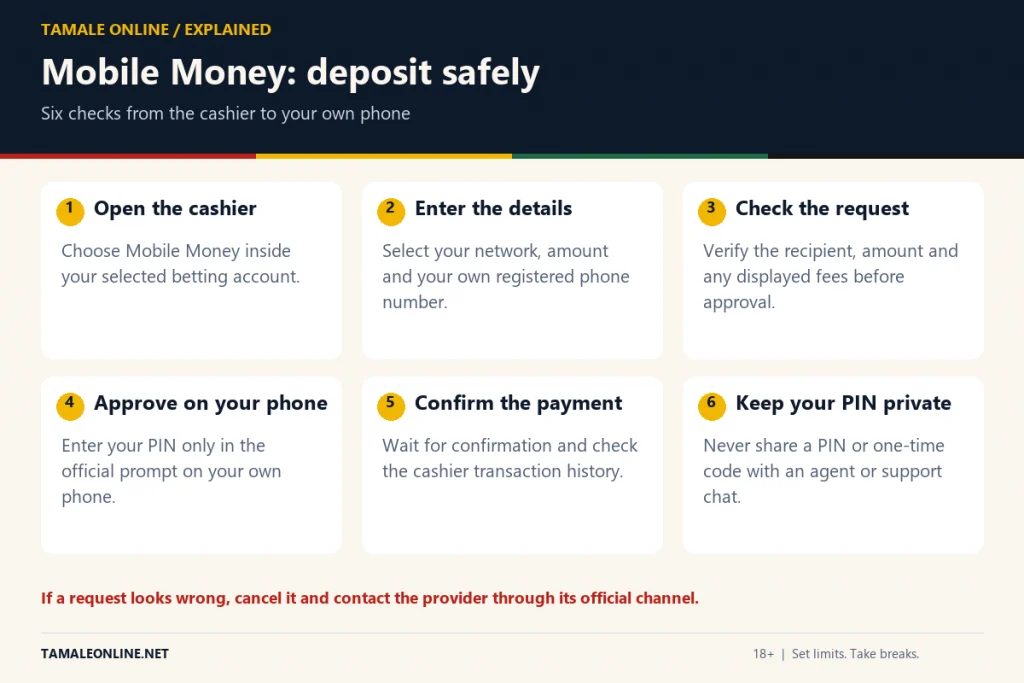
MSport deposit with MTN MoMo, step by step
- Open the MSport app or site and log in.
- Tap Deposit (usually the plus or wallet icon near your balance).
- Choose MTN Mobile Money, if it is listed, and confirm the phone number shown is yours.
- Enter the amount in cedis and submit.
- A payment prompt pops up on your phone. Check the amount and the recipient name, then enter your MoMo PIN.
- Wait for the MoMo confirmation SMS. The balance in MSport should update within moments.
If no prompt arrives, dial MTN's MoMo menu, *170#, and look for pending approvals, which is where some prompts wait. MSport's own merchant reference, where one is on file, is . We do not print payment codes from unofficial sources, because fake "deposit codes" are a known trick to send money to scammers.
Paying in with Telecel Cash or AT Money
The flow is the same for Telecel Cash and AT Money where MSport offers them: pick the network on the deposit screen, fill in the amount and approve on your phone. The approval steps differ a little by network, so follow the prompt rather than any code you saw in a WhatsApp group.
How MSport withdrawal works
- Go to your account and choose Withdraw.
- Select the Mobile Money network registered to your account.
- Enter an amount above the minimum shown on that screen and confirm.
- Wait for the MoMo credit SMS. If MSport asks for identity details first, complete that request in the app; payouts on unverified accounts can be held.
Any bonus balance is usually locked until its wagering rules are met, so only your cash balance can be withdrawn. Ghana scrapped the withholding tax on betting winnings in 2025, but tax rules can change; our Ghana betting tax guide explains how deductions would show on a payout.
Deposit or withdrawal not reflecting: what to do
| Problem | Likely cause | First step |
|---|---|---|
| MoMo debited, MSport balance unchanged | Delay between the network and the bookmaker | Wait a little, refresh, then send the MoMo transaction ID to MSport support |
| No PIN prompt | Network timeout or wrong number | Check pending approvals in the MoMo menu and retry once |
| Withdrawal pending | Verification or name mismatch | Open the account messages and complete any ID request |
| Withdrawal rejected | Amount below minimum or bonus funds | Check your cash balance and the minimum shown |
Keep the MoMo SMS for every payment. Support can trace a transaction ID quickly; a screenshot without it is much harder. Use only the support channels linked inside MSport's app or site, never a "refund agent" who contacts you first.
Safety rules for MoMo and betting
Nobody from MSport or your network needs your PIN. Never pay a stranger to "unlock" a withdrawal, and never fund your betting account from a company or family wallet that is not yours; disputes over such deposits can end up with frozen funds. For other bookmakers that handle Mobile Money well, see our MoMo betting sites page, or go back to the full MSport review.
MSport accounts are for adults 18+ only. Set a deposit limit in your account settings and stick to money you can afford to lose.
Frequently asked questions
How long does an MSport MoMo deposit take?
Usually moments after you approve the prompt with your PIN. If your wallet is debited but the balance does not change, contact MSport support with the MoMo transaction ID.
What is the minimum MSport deposit?
The current minimum is shown on the deposit screen and can differ by network. We show it in the key facts box only when it is confirmed.
Why is my MSport withdrawal pending?
The most common reasons are an identity check, a name mismatch between the account and the MoMo wallet, or trying to withdraw bonus funds that are still locked.
Can I withdraw to a different MoMo number?
Bookmakers normally pay out only to the number registered on the account. Using a wallet in your own name avoids delays.